Skip to content
  • Demo
  • Docs
  • Pricing
  • Contact

Start free trial

We bring together everything that’s required to build websites. Reach more customers, save time and money, and boost sales.

Edit Content

    • Facebook
    • Instagram
    • Twitter
    Purchase Theme

    Installation

    1
    • Installation Guide

    Getting Started

    1
    • Getting started

    Configuration Steps

    2
    • Setup Google Cloud Vision API
    • Xise Settings

    Xise Dashboard

    4
    • Dashboard
    • Index WooCommerce Product
    • Analytics
    • Xise Logs

    Integration

    1
    • Add Image Search button
    • Home
    • Docs
    • Xise Dashboard
    • Xise Logs

    Xise Logs

    < 1 min read

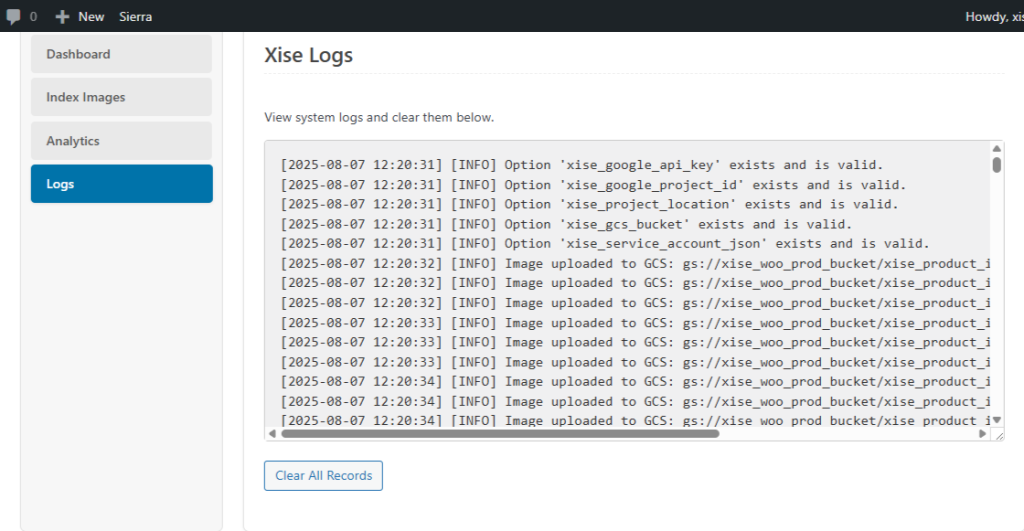
    Logs #

    The Logs section is where you can monitor the status of various background processes, such as image indexing. It’s a useful tool for troubleshooting any issues and confirming that tasks are running correctly. You can view detailed information about plugin actions and any errors that might occur.

    Updated on August 13, 2025

    What are your Feelings

    • Happy
    • Normal
    • Sad
    Share This Article :
    • Facebook
    • X
    • LinkedIn
    • Pinterest

    Powered by BetterDocs

    Leave a Reply Cancel reply

    Your email address will not be published. Required fields are marked *

    Table of Contents
    • Logs

    A powerful AI-driven image search plugin for WooCommerce that lets customers find products by uploading images.

    Features
    • Image Search
    • Auto indexing
    • Search Analytics
    • Seamless Integration
    Resources
    • Support center
    • Documentation
    • Faqs
    • Demo
    Get in touch
    • support@xiseai.com

    © XiseAI.com. All Rights Reserved.

    • Terms & Conditions
    • Privacy Policy